Join us October 28-29 in San Francisco or online for GitHub Universe, our flagship developer event uniting people, agents, and the world's code.
Register now
Shiny new commit styles
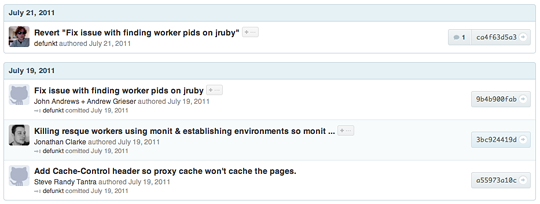
We just rolled out some redesigned commit blocks all over the site. They look a bit like this: There’s all kinds of nice additions — notably, we’ll show you the…
|1 minute
Share:
We just rolled out some redesigned commit blocks all over the site. They look a bit like this:
There’s all kinds of nice additions — notably, we’ll show you the full commit message anywhere a commit is displayed (with the +… button).
But the biggest change you’ll see is that we’ve started embracing the model for Git commit messages — a one line summary followed by an optional description. Tim Pope wrote about proper git commit messages a long while ago.
The gist of a great commit message is this:
Capitalized, short (50 chars or less) summary
More detailed explanatory text, if necessary. Wrap it to about 72
characters or so. In some contexts, the first line is treated as the
subject of an email and the rest of the textas the body. The blank
line separating the summary from the body is critical (unless you omit
the body entirely); tools like rebase can get confused if you run the
two together.
Write your commit message in the present tense: "Fix bug"andnot"Fixed
bug." This convention matches up with commit messages generated by
commands like git merge and git revert.
Further paragraphs come after blank lines.
- Bullet points are okay, too
- Typically a hyphen or asterisk is used for the bullet, preceded by a
single space, with blank lines in between, but conventions vary here
- Use a hanging indent
Capitalized, short (50 chars or less) summary

More detailed explanatory text, if necessary.  Wrap it to about 72
characters or so.  In some contexts, the first line is treated as the
subject of an email and the rest of the text as the body.  The blank
line separating the summary from the body is critical (unless you omit
the body entirely); tools like rebase can get confused if you run the
two together.

Write your commit message in the present tense: "Fix bug" and not "Fixed
bug."  This convention matches up with commit messages generated by
commands like git merge and git revert.

Further paragraphs come after blank lines.

- Bullet points are okay, too

- Typically a hyphen or asterisk is used for the bullet, preceded by a
  single space, with blank lines in between, but conventions vary here

- Use a hanging indent
If you follow these rules, your commit messages are going to look great on GitHub. And if not, we’ll try our best to make them look good anyway.
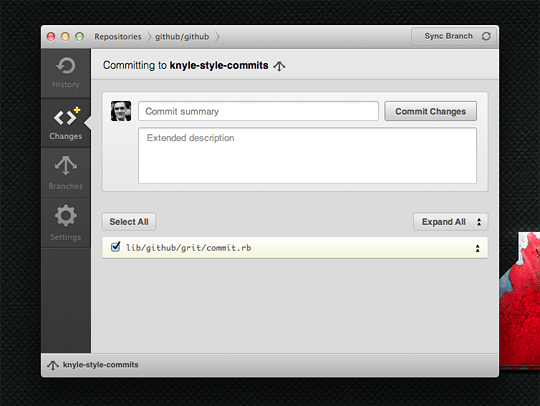
Of course, if you’re using GitHub for Mac, we do all of this for you. Just type in the fields and we’ll create a properly formatted message for you.