Good news for folks who want to get their web-based GitHub Flow on while remaining
cloaked in secrecy: Today we’re 🚢ing the ability to make your email address private!
Until today, all web-based GitHub Flow used your primary email address.
This included creating, editing, and deleting files, as well as merging pull requests.
But now you can keep your email address private. To do so, visit your email settings page:
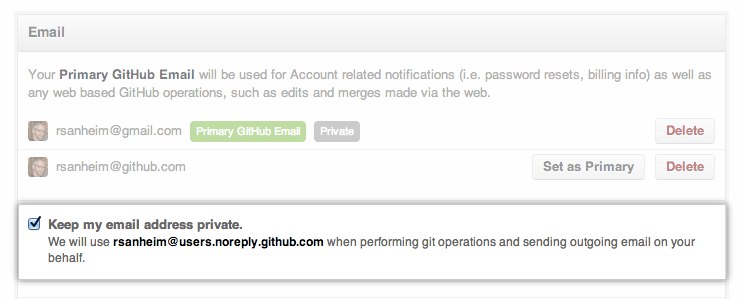
With this turned on, web-based operations will use a username@users.noreply.github.com email address.
Think of this as git config user.email for the website. You should still use git config
for configuring your email address for commits done via the command line, though.
For more information, see the help document.
Big 👍 to all the folks who suggested this feature, and happy [REDACTED] GitHubbing!


