| This is abridged content from August’s Insider newsletter. Like what you see? Sign up for the newsletter to receive complete, unabridged content in your inbox twice a month Sign up now > |
In this newsletter, we’ll explore a few insider tips and tricks you can use to make the most of GitHub Mobile, such as:
- Creating and managing issues with Issue Composer
- Customizing your mobile experience with shortcuts
Let’s dive in.
Have you ever gone for a midday coffee run and then all of a sudden remembered,“Oh, I should’ve updated those issues before I left!” No worries, Issue Composer has your back. With Issue Composer, you can create issues, document bugs, propose features, and engage in discussions directly from your mobile device. And now, with our new Property Bar feature, you can effortlessly add metadata to your issues, like assignees, labels, milestones, and projects. Plus, you can do all of this while you’re in line to place that coffee order. 😉
Check this out:

There are times when taking the scenic route makes sense, but maybe not necessarily when you’re working under a deadline. And that’s the beauty of shortcuts, right? With GitHub Mobile’s Shortcuts, you can access all of the important things, like issues, discussion, or pull requests, right on the home page of your mobile app.
To start customizing your shortcuts, simply open the app and click the “Get started” button.
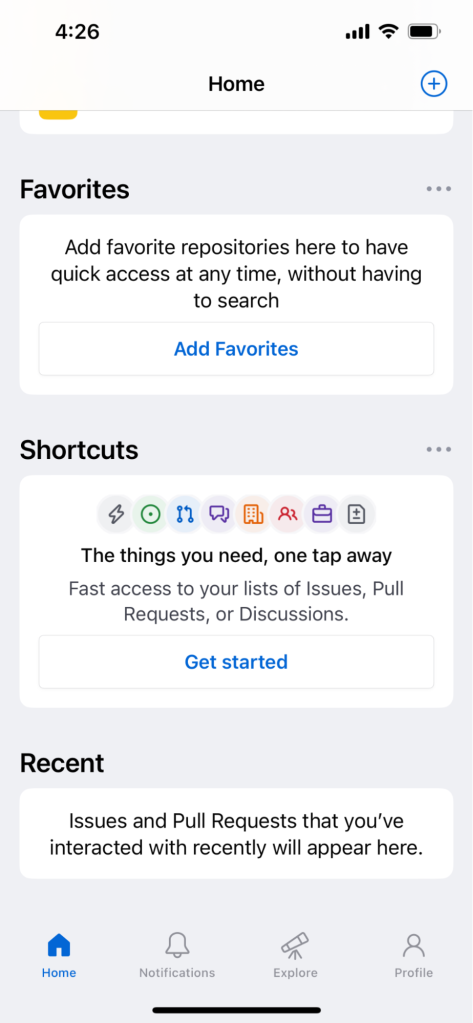
From there, you can either choose from the “suggested shortcuts” selection or create your own. When creating your shortcuts, the scope for customization is pretty vast. You can select:
- Open or closed issues
- Created, mentioned, or assigned issues
- All, private, or public repositories
- Filter by org
- Filter by repository
- Even sort from various categories and emojis
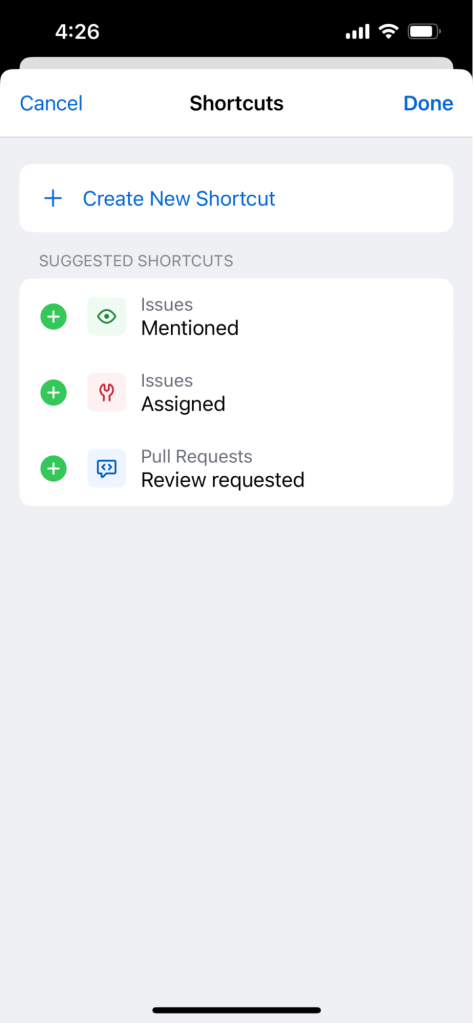
Once you save the shortcut, all the things you need are simply a tap away.
GitHub Mobile empowers developers to make meaningful contributions and stay productive no matter where they are. Whether you’re reviewing code, managing issues, or participating in discussions, you can stay connected and engaged with your projects at all times, even during downtime. And now that you’re armed with these tidbits, you’re on your way to becoming a mobile power user. 👊
Ready to try out these tips and features for yourself? Download GitHub Mobile.
Want to receive content like this twice a month, right in your inbox? Sign up for the newsletter now >