Have you ever worked with AI tools and wished they had access to some additional piece of context? Or wanted them to perform actions on your behalf? Think of those scenarios where you’re working with GitHub Copilot and you need it to check a GitHub Issue, run a Playwright test, or interact with an API. By default, these AI tools lack access to those external systems. But that’s where the Model Context Protocol (MCP) comes in. It’s a standardized way to extend AI tools with custom capabilities.
I wanted to learn more about it by building something visual and interactive. So I created a turn-based game server that lets you play Tic-Tac-Toe and Rock Paper Scissors against Copilot using MCP.
In my latest Rubber Duck Thursdays live stream, I walked through the project, which has a few components, all written in TypeScript:
A Next.JS Web App and API, intended to run locally for demo/learning purposes
Even with powerful AI agents, we continue to run into limitations:
AI tools can’t natively access private data for retrieval augmented generation, like information from our GitHub repositories.
They don’t have access to the latest documentation or real-time data.
Agents can’t perform actions like creating pull requests, exploring the UI on your locally running application, or interact with your APIs.
To access external context and take action, we need to extend the capabilities of these AI tools. But before MCP, there was no standard approach to integrating with third-party tools and services. You’d potentially need different plugins and different integration patterns for whatever AI tool you were using. MCP changes that by providing one standard way to plug tools and capabilities into any tool that supports the Model Context Protocol.
MCP follows a client-server pattern that’s familiar to most developers:
Host: The AI tool you’re using, like GitHub Copilot in VS Code (you’ll notice that Copilot in VS Code has good support in the MCP feature support matrix). The host initiates the connection to your MCP server via a client.
Clients: Clients live inside the host application (for example, GitHub Copilot in VS Code), and have a 1:1 relationship with a server. When VS Code connects to a new MCP server (like GitHub, Playwright or the turn-based-game MCP server we’re talking about in this post), a new client is created to maintain the connection.
Server: Your custom MCP server that provides tools, resources, and prompts. In our case, we’re making an MCP server that provides capabilities for playing turn-based games!
For my learning project, I wanted something visual that would show the overall MCP interaction and could be reused when people are trying to explain it as part of a talk. So I built a web app with Tic-Tac-Toe and Rock Paper Scissors. But instead of the game having two people play locally (or online), or even a CPU in the backend, the opponent’s moves are orchestrated by an MCP server.
The architecture includes:
Next.js frontend: The game interface where I make moves
API routes (part of the Next.js implementation): Backend logic for game state management, called by the frontend and the MCP server.
MCP server: TypeScript server that handles AI game moves
Shared libraries: Common game logic used across components
Here’s how it works in practice:
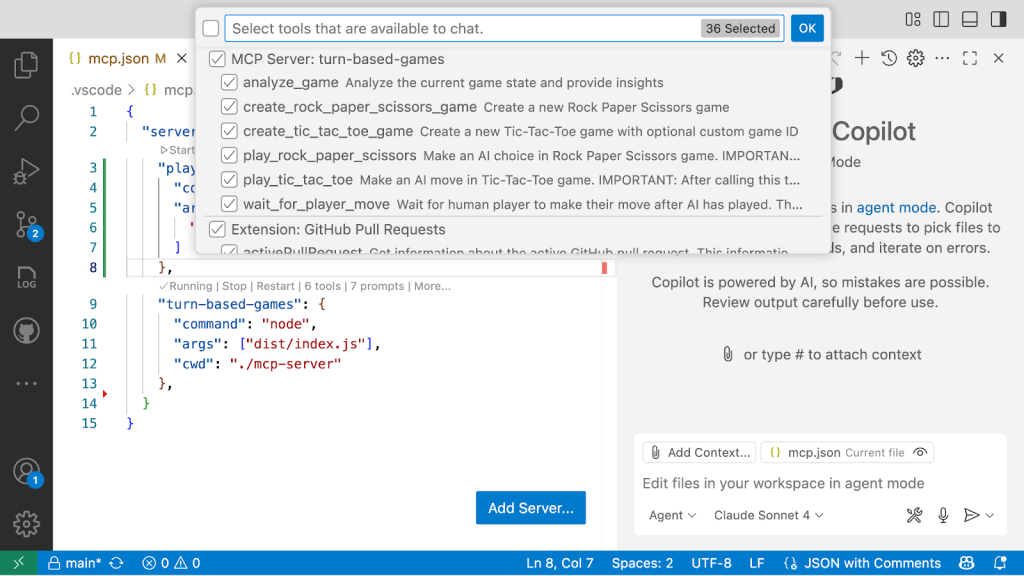
We register an MCP server in VS Code so that Copilot is aware of the new capabilities and tools.
I interact with GitHub Copilot in VS Code. I can call tools explicitly, or Copilot can autodiscover them.
Copilot calls the large language model. Based on the prompt context and the available tools, it may call the MCP server.
The MCP server executes the requested tool (like making a move in the game) and returns results.
Copilot uses those results to continue the conversation.
The magic step is when you register the MCP server with an MCP application host (in our example, GitHub Copilot in Visual Studio Code). Suddenly, your AI agent gains access to the capabilities that have been built into those servers.
The above configuration tells GitHub Copilot in VS Code that there are two MCP servers that we’d like to use:
A Playwright MCP server that is executed locally as an NPM package.
A turn-based-games MCP server that runs a server locally based on the compiled TypeScript code from our working directory.
For this implementation, I kept my turn-based-game MCP server architecture and logic relatively simple, with all components in a single repository. This monorepo approach bundles the web app, API, and MCP server together, making it straightforward to clone and run the entire system locally without complex dependency management or cross-repository setup. But for a more robust setup, you would likely distribute that MCP server either as a package (such as npm or a docker image), and have clear publishing and versioning processes around that.
Tools define what actions the MCP server can perform. In my game server, I specified tools like:
Analyze_game: Get the current state of any game
create_rock_paper_scissors_game: Start a new game of Rock Paper Scissors
create_tic_tac_toe_game: Start a new Tic-Tac-Toe game
play_rock_paper_scissors: Make an AI choice in Rock Paper Scissors
play_tic_tac_toe: Make an AI move in Tic-Tac-Toe
wait_for_player_move: Polls the endpoint until the player has made their move
Each tool has a clear description and input schema that tells the AI what parameters to provide:
{
  name: 'play_tic_tac_toe',
  description: 'Make an AI move in Tic-Tac-Toe game. IMPORTANT: After calling this tool when the game is still playing, you MUST call wait_for_player_move to continue the game flow.',
  inputSchema: {
    type: 'object',
    properties: {
      gameId: {
        type: 'string',
        description: 'The ID of the Tic-Tac-Toe game to play',
      },
    },
    required: ['gameId'],
  },
},
{
  name: 'play_tic_tac_toe',
  description: 'Make an AI move in Tic-Tac-Toe game. IMPORTANT: After calling this tool when the game is still playing, you MUST call wait_for_player_move to continue the game flow.',
  inputSchema: {
    type: 'object',
    properties: {
      gameId: {
        type: 'string',
        description: 'The ID of the Tic-Tac-Toe game to play',
      },
    },
    required: ['gameId'],
  },
},
GitHub Copilot and the Large Language Model (LLM) aren’t calculating the actual game moves. When Copilot calls the play_tic_tac_toe tool, the MCP server executes a handler for that specific tool that runs the CPU game logic, like random moves for Tic Tac Toe in “easy” difficulty or a more optimal algorithm for moves when using the “hard” difficulty.
In other words, tools are reusable pieces of software that can be called by the AI, often to take some form of action (like making a move in a turn-based game!).
Resources provide a way for the AI to gather context, and often have a URI-based identifier. For example, I implemented custom URI schemes like:
game://tic-tac-toe: List all Tic-Tac-Toe games
game://tic-tac-toe/{Game-ID}: Get state for a specific game of Tic Tac Toe
game://rock-paper-scissors: List all Rock Paper Scissors games
game://rock-paper-scissors/{Game-ID}: Get state for a specific game of Rock Paper Scissors
As the MCP resources docs explain, you can choose how these resources are passed. In our turn-based-game MCP server, there is a method that translates the resource URIs into an API call to the local API server and passes on the raw response, so that it can be used as context within a tool call (like playing a game).
asyncfunctionreadGameResource(uri) {
const gameSession = awaitcallBackendAPI(gameType, gameId);
if (!gameSession) {
thrownewError("Game not found");
}
return gameSession;
}
async function readGameResource(uri) {
  const gameSession = await callBackendAPI(gameType, gameId);
  if (!gameSession) {
    throw new Error("Game not found");
  }
  return gameSession;
}
The third concept is prompts. You’ll be very familiar with prompts and prompt crafting, as that’s the way that you interact with AI tools like GitHub Copilot. Your users could write their own prompts to use your tools, like “Play a game of Tic Tac Toe” or “Create a GitHub Issue for the work that we’ve just scoped out.”
But you may want to ship your MCP server with predefined prompts that help users get the most out of your tools. For example, the turn-based-game MCP comes with several prompts like:
Strategy guides for different difficulty levels
Game rules and optimal play instructions
Troubleshooting help for common scenarios
Your users can access these prompts via slash commands in VS Code. For example, when I typed /strategy, I could access the prompt asking for advice on optimal play for a given game or difficulty level.
While my game demo is intentionally simple to help you learn some of these initial concepts, the patterns apply to other MCP servers:
GitHub MCP server: Get information from existing GitHub Issues or pull requests, list Dependabot alerts, or create and manage issues and pull requests, all based on the access you provide via OAuth (in the remote MCP server) or a Personal Access Token.
Playwright MCP server: Automatically navigate to specific pages in a browser, click and interact with the pages, capture screenshots, and check rendered content.
Custom API servers: Connect to your internal services, databases, or business logic.
Tools, resources, and prompts are some of the most commonly used capabilities of the MCP specification. Recently, a number of additional capabilities including sampling and elicitation were added to the spec. I haven’t had a chance to add those yet, but perhaps they’ll feature as part of another stream!
You may need to handle authentication and authorization for production MCP servers depending on the scenario. As an example, the GitHub MCP server supports OAuth flows for the remote MCP server and Personal Access Tokens in local and remote. This turn-based game MCP server is intended to be simple, and doesn’t include any auth requirements, but security should be a key consideration if you’re building your own MCP servers.
You may not always need to create your own MCP server. For example, GitHub ships its own MCP server. Instead of creating your own version, why not make an open source contribution upstream to improve the experience for all?
Thought 💡: Make sure to do your due diligence on MCP servers before installing them, just like you would with any other dependency as part of your project’s supply chain. Do you recognise the publisher? Are you able to review (and contribute to) the code in an open source repository?
MCP provides SDKs for multiple languages, so you can build servers in whatever technology fits your stack, ranging from TypeScript to Python, Go to Rust and more. I chose TypeScript because I wanted my entire demo (frontend, backend, and MCP server) in one repository with shared code and a common language.
MCP standardizes AI tool extensibility across different platforms and applications (like Copilot in Visual Studio Code)
Reuse first by investigating what existing MCP servers are available. Review the MCP servers: Do you recognize the publisher and can you access the code?
Building your own? Start simple with focused servers that solve specific problems rather than trying to build everything at once
The three building blocks (tools, resources, prompts) provide a clear framework for designing the capabilities of your MCP server
MCP isn’t just about playing games with AI (though that was fun). It’s about breaking down the walls between your AI assistants and the systems they need to help you work effectively.
Whether you’re building internal developer tools, integrating with external APIs, or creating custom workflows, MCP provides the foundation you need to extend your AI tools in consistent, powerful ways.
Build a simple server for your internal APIs or development tools. You can check out the turn-based-game-mcp as an example.
Experiment with custom prompts that encode your team’s best practices.
The goal of MCP is to give your AI assistants the tools they need to be truly helpful in your specific development environment. So, which tool will you be using? What will you build?