Join us October 28-29 in San Francisco or online for GitHub Universe, our flagship developer event uniting people, agents, and the world's code.
Register now
Building AI-powered GitHub issue triage with the Copilot SDK
Learn how to integrate the Copilot SDK into a React Native app to generate AI-powered issue summaries, with production patterns for graceful degradation and caching.
The Copilot SDK lets you add the same AI that powers Copilot Chat to your own applications. I wanted to see what that looks like in practice, so I built an issue triage app called IssueCrush. Here’s what I learned and how you can get started.
If you’ve ever maintained an open source project, or worked on a team with active repositories, you know the feeling. You open GitHub and see that notification badge: 47 issues. Some are bugs, some are feature requests, some are questions that should be discussions, and some are duplicates of issues from three years ago.
The mental overhead of triaging issues is real. Each one requires context-switching: read the title, scan the description, check the labels, think about priority, decide what to do. Multiply that by dozens of issues across multiple repositories, and suddenly your brain is mush.
I wanted to make this faster. And with the GitHub Copilot SDK, I found a way.
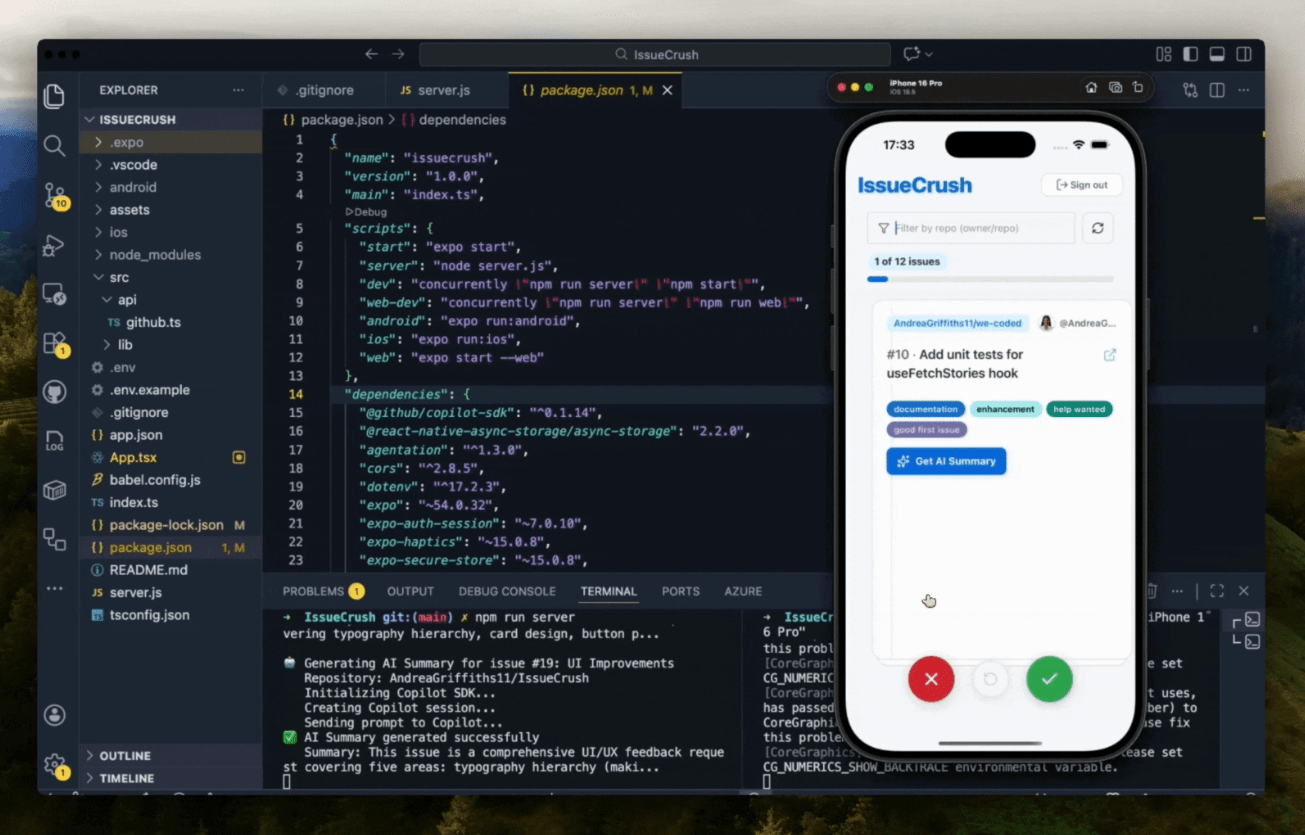
IssueCrush shows your GitHub issues as swipeable cards. Left to close, right to keep. When you tap “Get AI Summary,” Copilot reads the issue and tells you what it’s about and what to do with it. Instead of reading through every lengthy description, maintainers can get instant, actionable context to make faster triage decisions. Here’s how I integrated the GitHub Copilot SDK to make it happen.
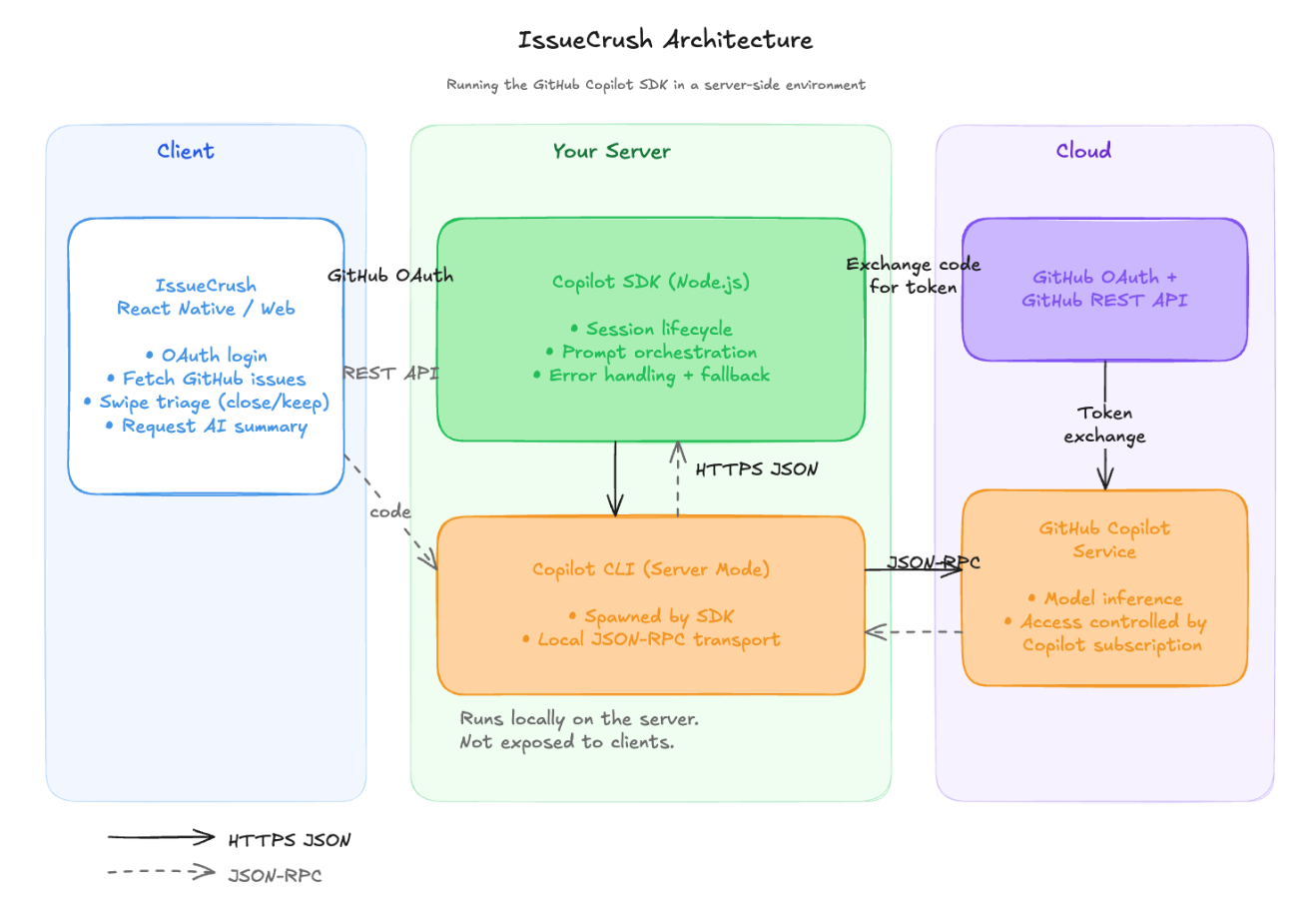
The first technical decision was figuring out where to run the Copilot SDK. React Native apps can’t directly use Node.js packages, and the Copilot SDK requires a Node.js runtime. Internally, the SDK manages a local Copilot CLI process and communicates with it over JSON-RPC. Because of this dependency on the CLI binary and a Node environment, the integration must run server-side rather than directly in a React Native app. This means the server must have the Copilot CLI installed and available on the system PATH.
I settled on a server-side integration pattern:
Here’s why this setup works:
Single SDK instance shared across all clients, so you’re not spinning up a new connection per mobile client. The server manages one instance for every request. Less overhead, fewer auth handshakes, simpler cleanup.
Server-side secrets for Copilot authentication, to keep credentials secure. Your API tokens never touch the client. They live on the server where they belongnot inside a React Native bundle someone can decompile.
Graceful degradation when AI is unavailable, so you can still triage issues even if the Copilot service goes down or times out. The app falls back to a basic summary. AI makes triage faster, but it shouldn’t be a single point of failure.
Logging of requests for debugging and monitoring, because every prompt and response passes through your server. You can track latency, catch failures, and debug prompt issues without bolting instrumentation onto the mobile client.
The SDK follows a strict lifecycle: start() → createSession() → sendAndWait() → disconnect() → stop().
Here’s something I learned the hard way: failing to clean up sessions leaks resources. I spent two hours debugging memory issues before realizing I’d forgotten a disconnect() call. Wrap every session interaction in try/finally. The .catch(() => {}) on cleanup calls prevents cleanup errors from masking the original error.
Prompt structure gives the model enough context to do its job. I provide structured information about the issue rather than dumping raw text:
const prompt = `You are analyzing a GitHub issue to help a developer quickly understand it and decide how to handle it.

Issue Details:
- Title: ${issue.title}
- Number: #${issue.number}
- Repository: ${issue.repository?.full_name || 'Unknown'}
- State: ${issue.state}
- Labels: ${issue.labels?.length ? issue.labels.map(l => l.name).join(', ') : 'None'}
- Created: ${issue.created_at}
- Author: ${issue.user?.login || 'Unknown'}

Issue Body:
${issue.body || 'No description provided.'}

Provide a concise 2-3 sentence summary that:
1. Explains what the issue is about
2. Identifies the key problem or request
3. Suggests a recommended action (e.g., "needs investigation", "ready to implement", "assign to backend team", "close as duplicate")

Keep it clear, actionable, and helpful for quick triage. No markdown formatting.`;
const prompt = `You are analyzing a GitHub issue to help a developer quickly understand it and decide how to handle it.

Issue Details:
- Title: ${issue.title}
- Number: #${issue.number}
- Repository: ${issue.repository?.full_name || 'Unknown'}
- State: ${issue.state}
- Labels: ${issue.labels?.length ? issue.labels.map(l => l.name).join(', ') : 'None'}
- Created: ${issue.created_at}
- Author: ${issue.user?.login || 'Unknown'}

Issue Body:
${issue.body || 'No description provided.'}

Provide a concise 2-3 sentence summary that:
1. Explains what the issue is about
2. Identifies the key problem or request
3. Suggests a recommended action (e.g., "needs investigation", "ready to implement", "assign to backend team", "close as duplicate")

Keep it clear, actionable, and helpful for quick triage. No markdown formatting.`;
The labels and author context matter more than you’d think. An issue from a first-time contributor needs different handling than one from a core maintainer, and the AI uses this information to adjust its summary.
The sendAndWait() method returns the assistant’s response once the session goes idle. Always validate that the response chain exists before accessing nested properties:
const response = await session.sendAndWait({ prompt }, 30000); // 30 second timeout let summary;
if (response && response.data && response.data.content) {
summary = response.data.content;
} else {
thrownewError('No content received from Copilot');
}
const response = await session.sendAndWait({ prompt }, 30000); // 30 second timeout

let summary;
if (response && response.data && response.data.content) {
   summary = response.data.content;
} else {
   throw new Error('No content received from Copilot');
}
The second argument to sendAndWait() is a timeout in milliseconds. Set it high enough for complex issues but low enough that users aren’t staring at a spinner. I’ve seen enough “undefined is not an object” errors to know you should never skip the null checks on the response chain.
Once a summary exists on the issue object, the card swaps the button for the summary text. If the user swipes away and comes back, the cached version renders instantly. No second API call needed.
AI services can fail. Network issues, rate limits, and service outages happen. The server handles two failure modes: subscription errors return a 403 so the client can show a clear message, and everything else falls back to a summary built from issue metadata.
} catch (error) {
// Clean up on error try {
if (session) await session.disconnect().catch(() => {});
if (client) await client.stop().catch(() => {});
} catch (cleanupError) {
// Ignore cleanup errors
}
consterrorMessage = error.message.toLowerCase();
// Copilot subscription errors get a clear 403 if (errorMessage.includes('unauthorized') ||
errorMessage.includes('forbidden') ||
errorMessage.includes('copilot') ||
errorMessage.includes('subscription')) {
return res.status(403).json({
error: 'Copilot access required',
message: 'AI summaries require a GitHub Copilot subscription.',
requiresCopilot: true
});
}
// Everything else falls back to a metadata-based summary constfallbackSummary = generateFallbackSummary(issue);
res.json({ summary: fallbackSummary, fallback: true });
}
} catch (error) {
   // Clean up on error
   try {
     if (session) await session.disconnect().catch(() => {});
     if (client) await client.stop().catch(() => {});
   } catch (cleanupError) {
     // Ignore cleanup errors
   }

  const errorMessage = error.message.toLowerCase();

  // Copilot subscription errors get a clear 403
   if (errorMessage.includes('unauthorized') ||
       errorMessage.includes('forbidden') ||
       errorMessage.includes('copilot') ||
       errorMessage.includes('subscription')) {
     return res.status(403).json({
       error: 'Copilot access required',
       message: 'AI summaries require a GitHub Copilot subscription.',
       requiresCopilot: true
     });
   }

  // Everything else falls back to a metadata-based summary
   const fallbackSummary = generateFallbackSummary(issue);
   res.json({ summary: fallbackSummary, fallback: true });
}
The fallback builds a useful summary from what we already have:
function generateFallbackSummary(issue) {
   const parts = [issue.title];

  if (issue.labels?.length) {
     parts.push(`\nLabels: ${issue.labels.map(l => l.name).join(', ')}`);
   }

  if (issue.body) {
     const firstSentence = issue.body.split(/[.!?]\s/)[0];
     if (firstSentence && firstSentence.length < 200) {
       parts.push(`\n\n${firstSentence}.`);
     }
   }

  parts.push('\n\nReview the full issue details to determine next steps.');
   return parts.join('');
}
function generateFallbackSummary(issue) {
   const parts = [issue.title];

  if (issue.labels?.length) {
     parts.push(`\nLabels: ${issue.labels.map(l => l.name).join(', ')}`);
   }

  if (issue.body) {
     const firstSentence = issue.body.split(/[.!?]\s/)[0];
     if (firstSentence && firstSentence.length < 200) {
       parts.push(`\n\n${firstSentence}.`);
     }
   }

  parts.push('\n\nReview the full issue details to determine next steps.');
   return parts.join('');
}
The server exposes a /health endpoint that signals AI availability. Clients check it on startup and hide the summary button entirely if the backend can’t support it. No broken buttons.
Summaries are generated on -demand, not preemptively. This keeps API costs down and avoids wasted calls when users swipe past an issue without reading it.
The SDK is loaded with await import('@github/copilot-sdk') instead of a top-level require. This lets the server start even if the SDK has issues, which makes deployment and debugging smoother.
The SDK communicates with the Copilot CLI process via JSON-RPC. You need the Copilot CLI installed and available in your PATH. Check the SDK’s package requirements for the minimum Node.js version.
Server-side is the right call. The SDK needs the Copilot CLI binary, and you’re not installing that on a phone. Running it on a server keeps AI logic in one place, simplifies the mobile client, and means credentials never leave the backend.
Prompt structure matters more than prompt length. Feeding the model organized metadata like title, labels, and author produces much better summaries than dumping the entire issue body as raw text. Give the model something to work with, and it’ll give you something useful back.
Always have a fallback. AI services go down. Rate limits happen. Design for graceful degradation from day one. Your users should still be able to triage issues even if the AI piece is offline.
Clean up your sessions. The SDK requires explicit cleanup: disconnect() then stop(). I skipped a disconnect() call once and spent two hours chasing a memory leak. Use try/finally every time.
Cache the results. Once you have a summary, store it on the issue object. If the user swipes away and comes back, the cached version renders instantly. No second API call, no wasted money, no extra latency.
AI can make maintainership sustainable. Triage is one of those invisible tasks that burns people out. Nobody thanks you for it, and it piles up fast. If you can cut the time it takes to process 50 issues in half, that’s time back for code review, mentoring, or just not dreading your notification badge. The Copilot SDK is one tool, but the bigger idea matters more: look at the parts of maintaining that drain you and ask if AI can take a first pass.
The @github/copilot-sdk opens real possibilities for building intelligent developer tools. Combined with React Native’s cross-platform reach, you can bring AI-powered workflows to mobile in a way that feels native and fast.
If you’re building something similar, start with the server-side pattern I’ve outlined here. It’s the simplest path to a working integration, and it scales with your app. The source code is available on GitHub: AndreaGriffiths11/IssueCrush.